
Selling in Canadian Dollars
Set your product prices directly in CAD — no need to guess at a USD equivalent.
Where to find it
When adding or editing a product, you'll see a Multi-currency Pricing section right below the standard Regular Price (USD $) and Sale Price (USD $) fields.
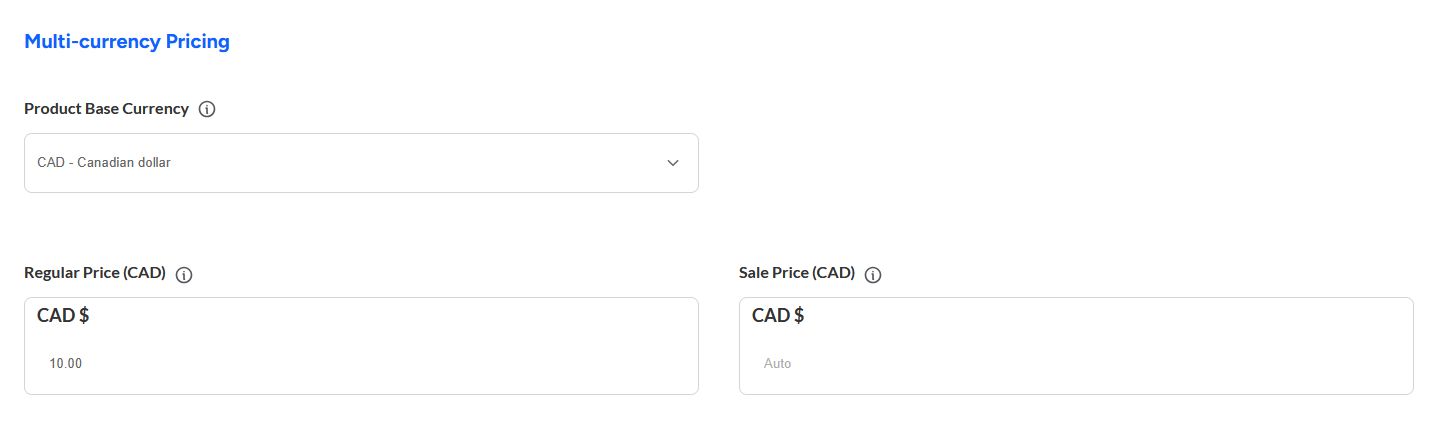
CAD pricing here currently only applies to simple products. If you sell variable products (e.g. products with size, colour or other options), CAD pricing can still be set up for those — just reach out and we'll take care of it.
To set a specific CAD price
From the Product Base Currency drop-down, choose CAD - Canadian dollar.
Enter your price in the Regular Price (CAD) field (and Sale Price (CAD), if you're running a sale). This is the exact price Canadian customers will see — it won't change with exchange rates.
If you only sell in Canada, you can leave the standard Regular Price / Sale Price fields (above the Multi-currency section) blank, and just fill in your CAD price. Customers browsing in other currencies will automatically see a converted price based on your CAD price.
Frequently Asked Questions
- How does this work for products I ship to multiple countries?
If you select CAD as your Product Base Currency and provide a Regular Price in CAD but leave the Regular Price (USD $) blank, anyone visiting from outside Canada will see and be charged in USD. The USD amount shown will be automatically converted to USD based on the CAD <-> USD exchange rate of the day.